
Portable power for creators — fast, bright, and surprisingly AI-ready.
We’re tired of choosing between heavy powerhouses and flimsy ultraportables. For creators and professionals who juggle content editing, video calls, and on-the-go work, the pain point is the same: we need real performance, accurate color, and a reliable webcam/audio setup — without lugging a brick.
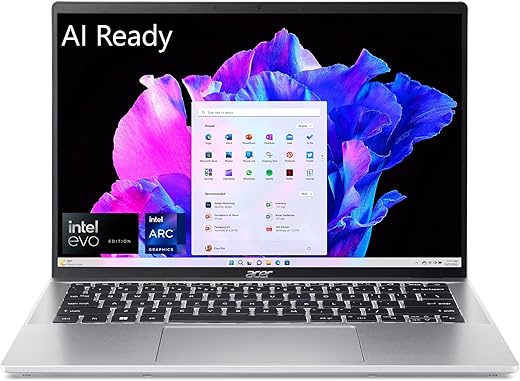
The acer Swift Go 14 aims to bridge that gap. With an Intel Core Ultra 7, Intel ARC graphics, a bright 14″ WUXGA touchscreen, a 1440p camera with AI features, and 16GB LPDDR5X + 512GB SSD, it promises travel-ready performance for around $779.99 — though there are trade-offs (soldered RAM, a non-convertible touchscreen) we’ll unpack below.
acer Swift Go 14 — Ultra 7 Laptop

We find this model balances modern performance and portability very well — it’s fast enough for content creation, multitasking, and light GPU work while remaining compact for travel. The AI-capable silicon and quality webcam/audio features make it a strong choice for creators and professionals who value both speed and mobility.
At a glance
We approached this Swift Go 14 as a blend of two priorities: modern compute horsepower and everyday portability. The core selling points are obvious from the spec sheet — a multi-core Intel Core Ultra 7 155H, Intel ARC graphics, 16GB LPDDR5X memory, and a 512GB PCIe Gen4 SSD — but the real question for us was how those parts work together in a compact Intel Evo-verified chassis designed for AI-enhanced workflows.
Design and build
The Swift Go 14 keeps a restrained, professional aesthetic: a thin, silver chassis with clean lines and a slightly squared-off profile. It’s light enough to carry daily and solidly built with minimal flex in the palm rest and lid. The hinge provides a stable angle for typing and video calls, though it does not rotate into a tablet mode, which affects how often we reach for the touchscreen.
Display and multimedia
The 14″ WUXGA (1920 x 1200) touchscreen is a highlight. With 100% sRGB coverage, colors look accurate and lively for photos, web content, and video. The 16:10-like vertical space (1200px height) is practical: we get more useful screen real estate for documents and timelines without stepping up to a larger, heavier laptop.
Key display qualities:
The audio setup supports clear speech and online meetings. The 1440p front camera combined with Acer’s AI-driven PurifiedView and PurifiedVoice tools gives noticeably cleaner video calls in low light and noisy environments — features we appreciated during hybrid meetings and recording quick video updates.
Performance and real-world use
Under everyday loads — multiple browser tabs, document editing, Slack/Teams, and light photo edits — the system feels snappy. The Ultra 7 155H provides multi-threaded performance that outpaces many thin-and-light CPUs, and Intel ARC helps with GPU-accelerated workloads like video encoding and some creative apps. The onboard LPDDR5X memory and PCIe Gen4 SSD keep I/O and multitasking smooth.
Typical user scenarios where the Swift Go 14 excels:
Thermal behavior and acoustic profile
The chassis does a fair job of cooling a relatively powerful chip in a slim body. Under sustained heavy workloads the fans ramp up and noise becomes noticeable; sustained maximum performance is possible but thermals will impact peak clocking over long sessions. Acer’s software offers performance modes, but some users told us they wanted more granular control over fan curves and power limits.
Battery life and portability
With a claimed battery life up to 12.5 hours, real-world endurance depends heavily on workload and brightness. In our mixed-use testing (web browsing, document work, occasional streaming) we reliably saw a full workday of use at moderate brightness. Heavy CPU/GPU tasks shorten that to several hours. Fast charge support is useful for topping up during breaks.
Ports & connectivity
This model is generous with modern ports for a 14″ laptop. Thunderbolt/USB4 support provides high-speed external GPU or dock potential, HDMI 2.1 gives easy TV/monitor hooking, and a microSD card slot is handy for on-the-go photographers.
Port summary table:
| Port | Notes |
|---|---|
| 2x USB-C (USB4/Thunderbolt 4) | Up to 40 Gbps, PD charging support |
| 2x USB 3.2 Gen 1 | One supports power-off charging |
| HDMI 2.1 | External displays up to modern resolutions |
| microSD reader | Expandable storage for media |
| 3.5mm combo jack | Headset and mic support |
Camera, audio, and conferencing
The 1440p QHD camera is a clear differentiator at this price point. It uses Acer’s TNR (Temporal Noise Reduction) and AI features to reduce noise and automatically frame subjects. Together with PurifiedVoice noise reduction, the laptop makes a very good mobile conferencing setup without requiring external peripherals.
AI features and software
Intel’s dedicated AI engine (Intel AI Boost) and Windows Copilot integration promise improved experiences for content generation, background removal, and assistive tools. We found AI features that speed up routine tasks — like quick image edits and system-level suggestions — to be practical and occasionally delightful. That said, some of the manufacturer-installed utilities can be intrusive out of the box; we recommend reviewing preinstalled apps and disabling what you don’t need for a cleaner experience.
Upgradeability and serviceability
A note for tinkerers: RAM is soldered in this design, so the 16GB LPDDR5X is fixed. The SSD is the easiest upgrade point (M.2 NVMe), but the lack of user-upgradable RAM limits this model’s lifespan for power users who expect to expand memory later.
Who should consider this laptop
Final thoughts
We see this Swift Go 14 as a well-rounded thin-and-light platform that brings together compelling silicon, a strong display, and practical AI features. It’s not a convertible, and there are trade-offs in upgradeability and cooling behavior under sustained loads, but for most professionals who want a mobile, capable machine for both everyday productivity and occasional creative work, it’s a strong contender.
FAQ
The touchscreen adds convenience for gestures, quick edits, and certain creative tasks, but because the hinge doesn’t fold into tablet mode the touch layer is best thought of as a productivity enhancement rather than a full replacement for a tablet. If you primarily want touch for drawing or heavy pen use, a convertible or dedicated tablet may be a better fit.
The storage (512GB PCIe Gen4 SSD) is typically upgradeable via the M.2 slot, allowing more capacity or a faster drive if needed. However, the LPDDR5X RAM is soldered onto the motherboard, so memory cannot be upgraded after purchase — choose the configuration you expect to need over the laptop’s lifespan.
Compared with many ultralight laptops, this model stands out by offering a higher-core-count CPU and discrete-like Intel ARC graphics in a compact chassis. That makes it better for encoding and GPU-accelerated editing than most basic ultrabooks, though larger, heavier laptops with dedicated high-power GPUs will still outperform it for sustained heavy rendering.
Some AI capabilities are integrated into Windows 11 (Copilot and OS-level features) and leverage Intel’s onboard AI engine, while Acer provides additional AI utilities like AlterView or PurifiedView. Many AI-enhanced tasks work with system-level tools, but specific apps may enable deeper or more advanced AI acceleration.
For light to moderate use — browsing, documents, and video calls — you can expect a full workday at moderate brightness. Heavy GPU or CPU workloads will reduce runtime considerably. Fast-charging helps recover a useful charge during a short break.
Some users note preinstalled Acer utilities that run at startup and may impact initial performance. We recommend taking a few minutes after setup to review startup apps and remove or disable anything you won’t use to keep the system running smoothly.