
We pitted them head-to-head — could the Pixelbook Go’s buttery keyboard and battery life actually beat the Flip’s chameleonic 2‑in‑1 versatility for our everyday productivity and play?
Need a reliable Chromebook for class, commuting, or light creation? We compare the renewed Google Pixelbook Go and the ASUS Chromebook Flip to recommend the best choice for students, commuters, and casual creators, focusing on portability, performance, and overall value.
Ultra Portable
We appreciate its light, well-built design and long battery life, which make it ideal for day-long productivity on the go. While it’s not a powerhouse for heavy multitasking or local storage-heavy workflows, it delivers a smooth, quiet ChromeOS experience for most everyday tasks.
Flexible Productivity
We find this Flip to be a versatile, value-oriented Chromebook that suits students and users who want a larger touchscreen and flexible 2-in-1 modes. It trades some portability and raw CPU punch for a better display, extra storage, and broader connectivity.
Google Pixelbook Go
ASUS Flip CX1
Google Pixelbook Go
ASUS Flip CX1
Google Pixelbook Go
ASUS Flip CX1
Design & Display: Build Quality, Portability, and Touch Experience
Build & portability
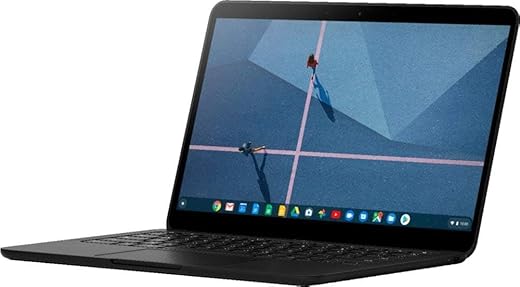
We appreciate how the Pixelbook Go leans into simplicity: a lightweight clamshell (about 2.33 lbs, 12.2 x 8.1 x 0.5 in) with a grippable matte finish and a fan‑less, quiet chassis. It’s built for laps and long commutes where low weight and silence matter most.
The ASUS Chromebook Flip CX1 takes a different route: a sturdier 14″ convertible that feels more substantial (≈3.59 lbs) and uses a polished “Transparent Silver” chassis with MIL‑STD style durability claims. That extra heft buys a bigger screen and the freedom to use tent/stand/tablet modes.
Display & touch experience
The Pixelbook Go typically ships with a 13.3″ touch option that favors a matte, anti‑glare surface on some SKUs — easier on the eyes outdoors, though some renewed units use the lower 1366×768 panel. The ASUS Flip’s 14″ NanoEdge FHD (1920×1080) delivers noticeably sharper text and wider viewing angles for media and multitasking.
Keyboard, trackpad & ports
We find the Pixelbook Go’s backlit Hush Keys and roomy, accurate trackpad among the best for long typing sessions. The Flip’s keyboard is comfortable too, but some configurations may lack backlighting.
How they handle on the go
For travel and light desk work we prefer the Pixelbook Go’s lighter, quieter profile. If we need tablet‑style browsing, shared screens, or a larger canvas for multitasking, the ASUS Flip’s 360° hinge and FHD display make it the better mobile workstation.
Performance & Battery: Everyday Speed, Multitasking, and Endurance
CPU, storage and what that means day to day
We compare the Pixelbook Go’s Intel Core m3 (Y‑series) against the ASUS Flip’s Intel Celeron N4500. Both come with 8 GB RAM, but the m3 is a noticeably stronger chip for single‑threaded tasks and snappier app launches. Storage differs: the Pixelbook’s 64 GB NVMe/SSD (renewed SKU) boots and opens files faster than the Flip’s larger 128 GB eMMC, which is slower on random reads/writes.
App responsiveness and browser tab handling
In everyday browsing and light web apps we see:
Light content creation & streaming
Both stream 1080p video smoothly. For light photo edits and multitasking, the Pixelbook’s m3 gives a snappier feel; the Flip is competent for editing small images and casual Android apps, but export times and complex browser workloads will be slower.
Battery life, charging and typical endurance
Under typical use (browsing, docs, occasional YouTube):
Thermals and sustained performance
Both are low‑power Chromebooks and rarely overheat. The fanless Pixelbook stays quietly cool for most tasks; it may plateau under prolonged heavy web workloads. The Flip’s slightly larger chassis helps dissipate heat, but the Celeron’s lower peak power is the limiting factor for sustained performance.
Feature Comparison Chart
Software, Features & User Experience: ChromeOS, Extras, and Usability
ChromeOS updates, security, and Google ecosystem
We appreciate ChromeOS for its speed, sandboxing, and automatic updates. Both machines benefit from ChromeOS’ built‑in security and the Play Store app catalog, but the Pixelbook Go adds a visible advantage: Google’s Titan C security chip and Google‑branded polish that often translates to a smoother integration with Gmail, Drive and Pixel phone features. If you’re buying a renewed Pixelbook, check the Auto Update Expiration (AUE) date—Google devices sometimes get longer guaranteed updates than generic OEM models.
Touch, tablet mode, and stylus notes
The Flip’s 360° hinge is a practical game changer: tablet mode and tent/stand setups make presentations, reading and couch use much more natural. This CX1 SKU supports touch for every mode, but it doesn’t include an active stylus—if pen input is core to your workflow, verify USI/stylus support before buying. The Pixelbook Go is not a convertible, so it stays a traditional clamshell — but its touchpad and keyboard weigh heavily in favor of precise, laptop‑first work.
Webcam, audio, microphones, and input quality
For everyday video calls we found:
Connectivity, extras and practical usability
Both devices feel polished for typical student and office workflows. The Flip wins for ports (USB‑A, USB‑C, microSD) and Wi‑Fi 6, which we use for multi‑device homes. The Pixelbook wins for keyboard comfort and a quieter, fanless lap experience. Neither SKU lists a fingerprint reader, and backlit keyboards vary by Flip configuration—confirm the exact spec if that matters.
Price, Value & Who Should Buy Which
Price snapshot and warranty notes
We compare a renewed Google Pixelbook Go (about $239) against a new ASUS Chromebook Flip CX1 (about $280). The Pixelbook’s lower price gets us a premium-feeling laptop at a bargain, but remember renewed units usually come with a limited seller warranty—confirm return windows and any coverage. The ASUS ships new with the manufacturer’s standard warranty and a full‑spec sheet out of the box.
Value trade-offs
We weigh obvious spec and experience differences rather than vague claims:
Factor expected lifespan: Pixelbook’s Google hardware often gets favorable ChromeOS update windows, but verify Auto Update Expiration for any renewed unit. ASUS gives a new‑device warranty and more local storage to delay reliance on cloud-only workflows.
Who should buy which
Final Verdict: Which Chromebook We Recommend
We pick the renewed Pixelbook Go as our overall winner for everyday use: its Intel Core m3, SSD and light, refined clamshell design deliver smoother performance, better typing, and travel-friendly battery life. It feels premium, wakes quickly, and the SSD keeps apps snappy — a smart pick for students and commuters.
Choose the ASUS Chromebook Flip when we want a larger 14-inch touchscreen, convertible 2-in-1 flexibility and more onboard storage at a stronger new-device price; otherwise grab the Pixelbook Go. If we need a big touchscreen, tablet mode or extra 128GB, the ASUS is the practical choice.